How do I review return settings and return reasons?
Last updated: May 18, 2026
Quick answer
Use this article to review return settings and the list of return reasons for a warehouse.
Common use cases
- Operations manager: Check whether self-returns and return labels are enabled.
- Customer support lead: Review which return reasons customers or staff can use.
- Admin: Confirm return active days, processing fee fields, policy URL, and branded self-return portal access.
When to use this
- You need to find return settings for a warehouse.
- You need to review return reasons and whether they are active.
- You need to check the branded self-return portal link.
When not to use this
- You need legal advice for return policy wording.
- You need to process a specific returned item.
- You need a guaranteed refund, fee, label, or billing result.
At a glance
| What you are doing | What you need | Good result | Contact us if |
|---|---|---|---|
| Use this article to review return settings and the list of return reasons for a warehouse. | Confirm you have admin access to Settings. Know which warehouse you want to review. | You can see the selected warehouse's return settings and active return reasons, and you know which settings may affect the customer return experience. | You cannot access Return Settings, a setting does not save or behave as expected, a return reason is missing from live return creation, or the branded portal does not match your expected policy. |
Before you start
- Confirm you have admin access to Settings.
- Know which warehouse you want to review.
- Confirm your company's return policy before changing customer-facing settings.
Steps
- Go to Settings in the left navigation.
- Open Return Settings.
- In Select Warehouse, choose the warehouse you want to review.
- Review the return options:
- Allow self return
- Provide Shipping Label
- Return Active Days
- Return processing fee
- Return processing fee per country
- Return policy url
- Branded Self-Return Portal
- Use Add custom country fees if your account needs country-specific return fee setup.
- Select View Portal to check the customer-facing self-return portal.
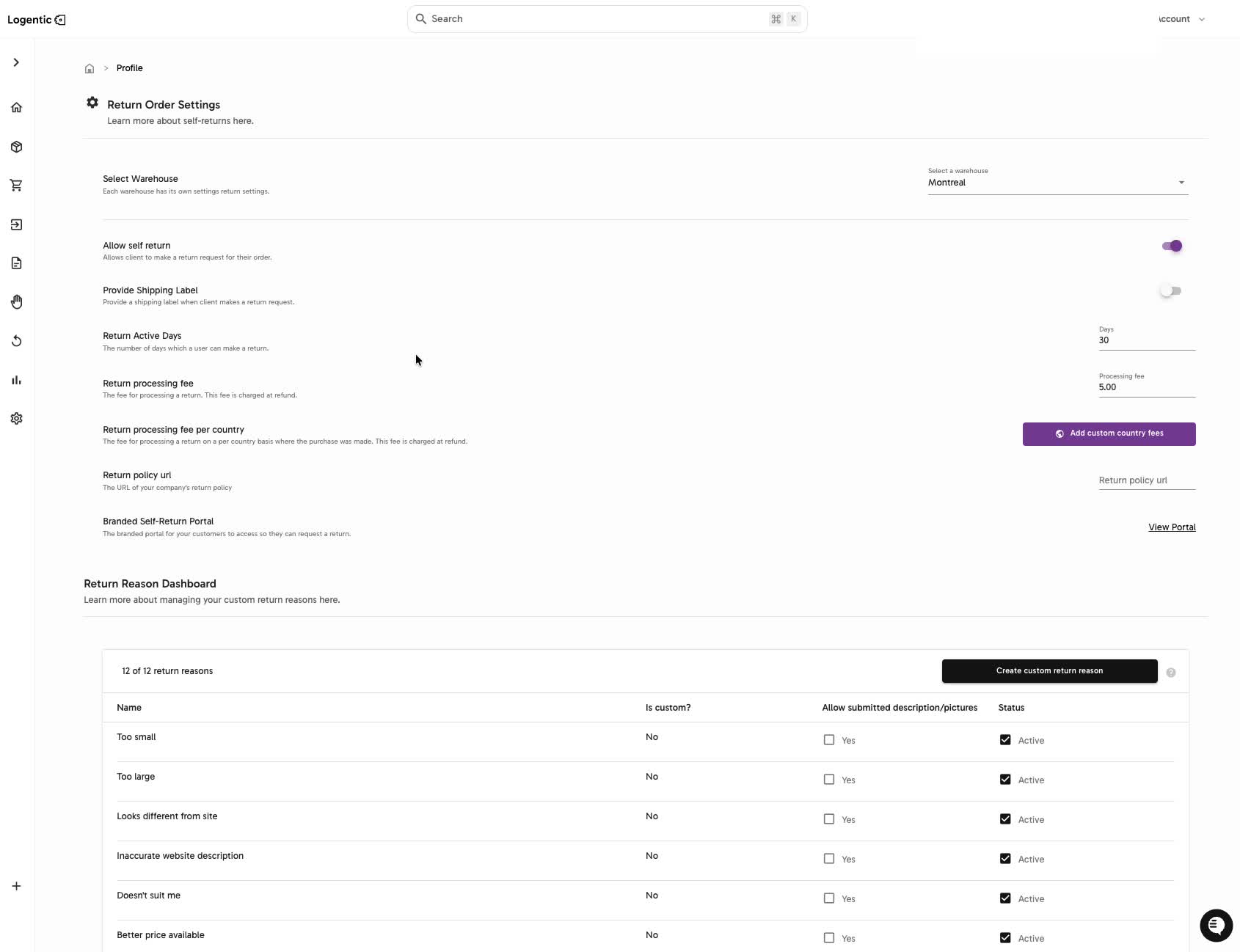
- In Return Reason Dashboard, review each reason, whether it is custom, whether submitted descriptions or pictures are allowed, and whether the reason is active.
- Select Create custom return reason when you need to add a new reason.
Screenshots
Steps 1-8: Open Return Settings, select a warehouse, review return options, portal access, and active return reasons.
What good looks like
You can see the selected warehouse's return settings and active return reasons, and you know which settings may affect the customer return experience.
Common issues and next actions
| If this happens | What to do next |
|---|---|
| A return reason is missing. | Review Return Reason Dashboard and use Create custom return reason if your role allows it. |
| The portal does not match the expected policy. | Review Return policy url, return active days, label settings, and fee fields. Contact us if the portal still does not match what you expect. |
| A setting is visible but you are unsure what it changes. | Do not change the setting during live operations. Confirm with your admin or contact Logentic first. |
Contact us when
You cannot access Return Settings, a setting does not save or behave as expected, a return reason is missing from live return creation, or the branded portal does not match your expected policy.
Contact options
- Email Logentic Support: best for detailed requests, screenshots, or follow-up context.
- Open in-app chat: fastest when you are already signed in and need help in context.
- Call Logentic: call (855) 529-0009 for an urgent launch, warehouse, or fulfillment blocker.
- Request Slack support access: ask us to add your team to a shared Logentic support channel.
Send us this information
- Screenshot of Return Settings.
- Warehouse selected.
- Setting or return reason you expected to see.
- Expected result.
- Actual result shown in Logentic.
- Whether the issue affects the branded self-return portal.
Related workflow
- Review return settings and return reasons.
- Create or update return rules with your admin process.
- Create and process returns using the configured reasons.